
Free construction calculators for quick, accurate estimates, measurements, and project planning
Size to Weight Calculator
Instantly estimate an object's weight from its dimensions and material.
Material Properties
Object Dimensions
Quantity
Your Estimate
Total Volume
0.00
cm³
Total Weight
0.00
kg
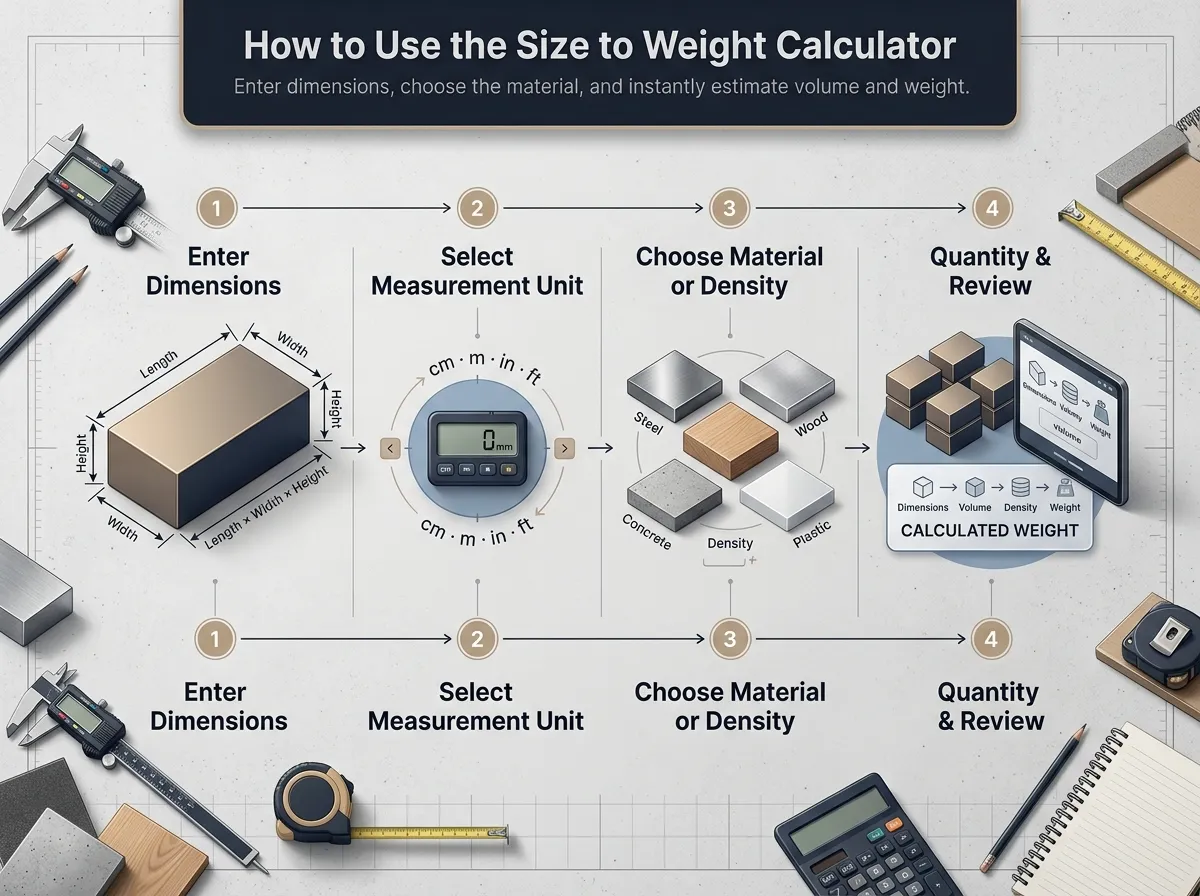
How to Use the Size to Weight Calculator
Getting an accurate weight estimate is quick and easy. Follow these simple steps to calculate the weight of your objects.
1
Enter Dimensions
Input the object's exact length, width, and height into the respective fields.
2
Select Measurement Unit
Choose the correct unit (cm, m, in, ft) for your dimensions to ensure precise calculations.
3
Choose Material or Density
Select a common material from the list, or manually enter the exact density of your object if known.
4
Quantity & Review
Enter the number of items if applicable, then immediately review your calculated volume and weight.
How Size to Weight Calculation Works
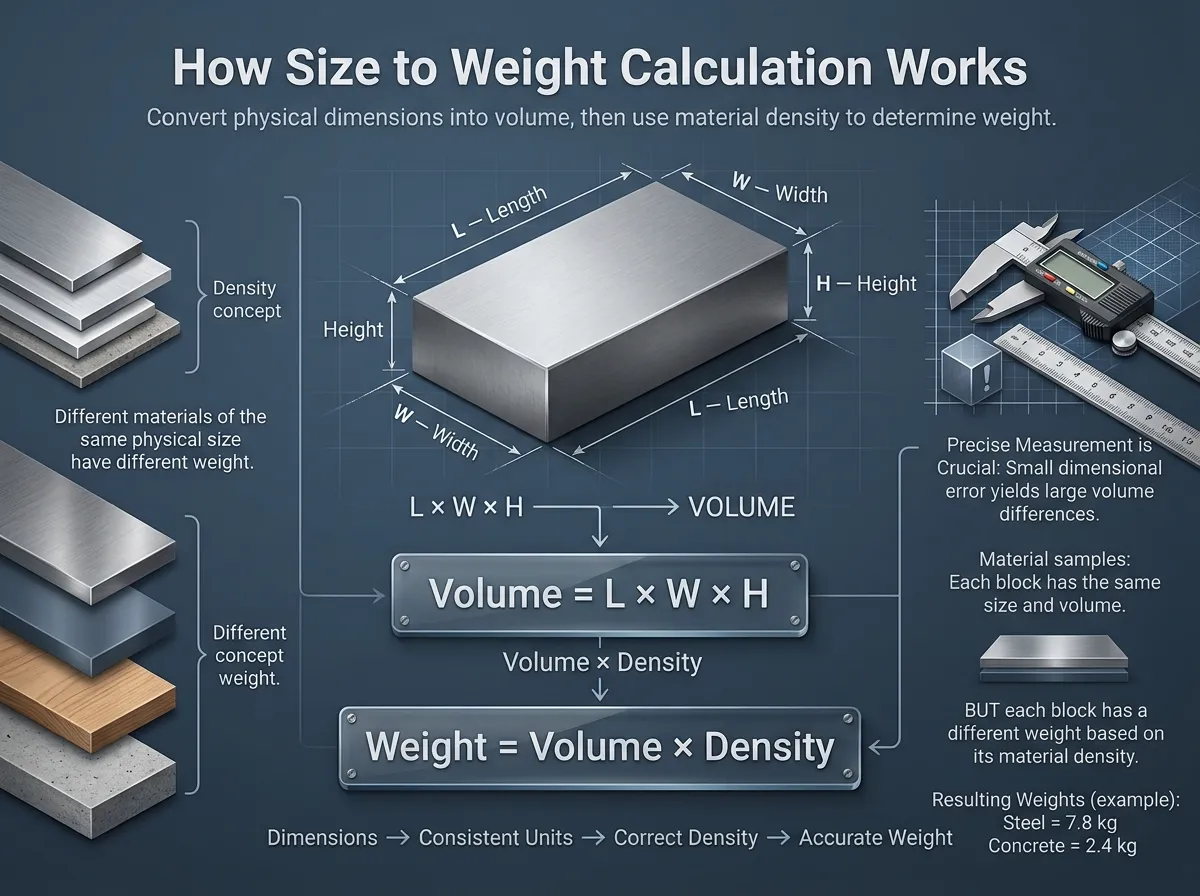
Calculating an object's weight from its size relies on a straightforward mathematical process. Understanding this helps you ensure accurate results for any project.
The Formulas
Step 1: Find Volume
Volume = L × W × H
Step 2: Find Weight
Weight = Volume × Density
Why Accuracy Matters
The correct measurement unit and material density are absolutely crucial for a precise estimate.
A small error in dimensions is multiplied significantly when calculating volume, which alters the final weight. Likewise, mixing up density units (e.g., kg/m³ instead of lb/ft³) will completely throw off the calculation.
How to Calculate Weight from an Object's Size
Our tool simplifies the physics into four easy steps.
Select Material
Choose a material from the dropdown list to auto-fill its density, or enter a custom density value if you know it.
Enter Dimensions
Measure the object's length, width, and height. Input these values into the calculator and select their corresponding units.
Get Volume
The tool instantly calculates the total volume of the object based on the dimensions you provided (Volume = L × W × H).
Find Weight
Using the calculated volume and material density, the final weight is shown (Weight = Volume × Density).
Why Use Our Size to Weight Calculator?
Our tool is designed for accuracy, speed, and ease of use, no matter your project.
Extensive Material Library
Instantly access density information for common materials like steel, aluminum, wood, and concrete, saving you time on research.
Flexible Unit Conversion
Mix and match metric (meters, cm) and imperial (feet, inches). The calculator handles all conversions automatically.
Shareable Results
Easily share a link to your calculation with colleagues, clients, or team members for seamless collaboration and verification.
Visualizing the Size-to-Weight Formula
The relationship between volume, density, and weight is the key to this calculation.
The core principle is simple: an object's weight is determined by how much "stuff" (volume) is packed into it and how heavy that "stuff" (density) is.
The Science Behind the Calculation
This tool operates on a fundamental principle of physics that connects three key properties of any object: its volume, its density, and its weight. Understanding these concepts helps clarify how our calculator arrives at an accurate estimate.
| 1. Volume | This is the amount of three-dimensional space an object occupies. For a rectangular object like a box or a beam, it is calculated with the simple formula: Volume = Length × Width × Height. Volume tells you the size of the object, but not how heavy it is. |
| 2. Density (ρ) | This is an intrinsic property of a material that measures how much mass is packed into a given volume. For example, a block of steel has a much higher density than a block of wood of the same size. That's why steel is heavier. Density is typically expressed in units like kilograms per cubic meter (kg/m³) or pounds per cubic foot (lb/ft³). |
| 3. Weight | This is the force of gravity acting on an object's mass. By combining volume and density, we can determine the object's mass, and therefore its weight. The final calculation is straightforward: Weight = Volume × Density. Our calculator performs all the necessary unit conversions to ensure the final result is accurate and easy to understand. |
Actual Weight vs Dimensional Weight
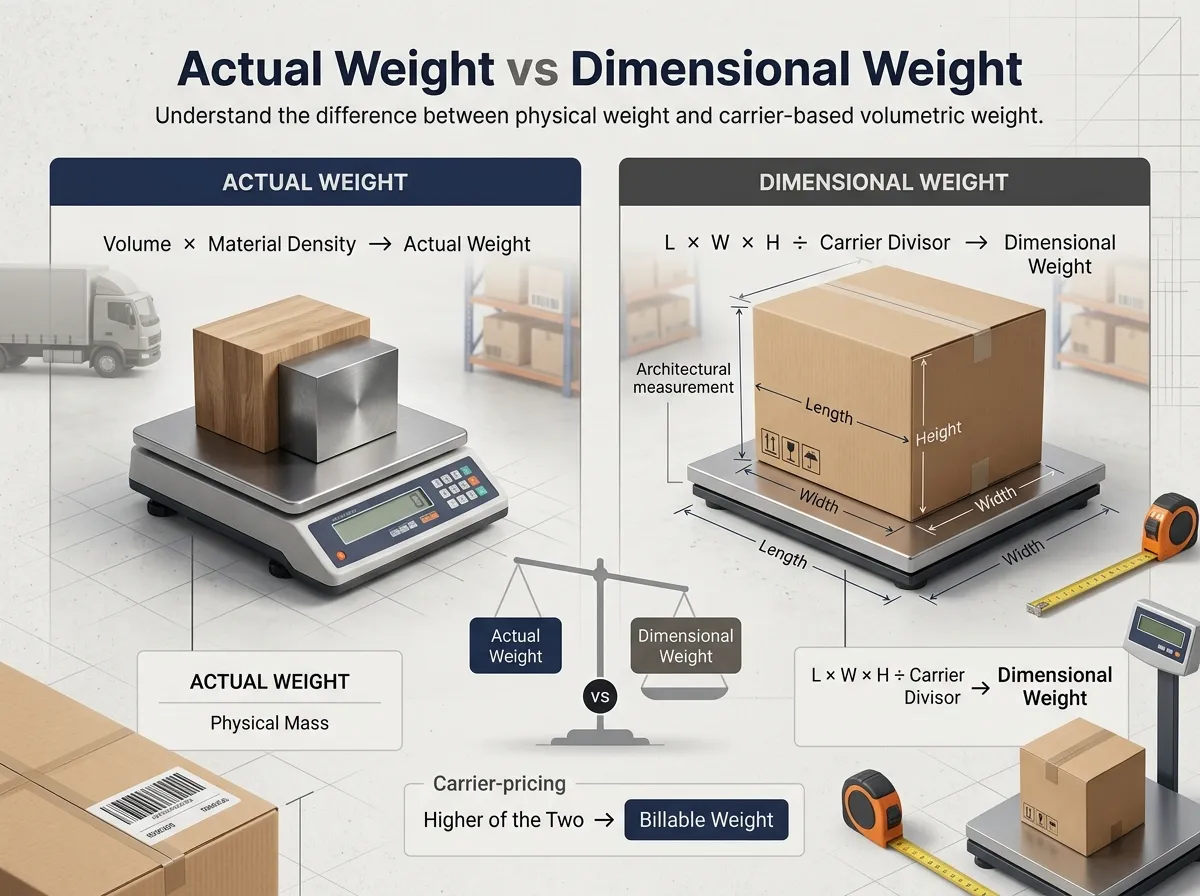
When estimating shipping or transport logistics, it's essential to understand the difference between actual weight and dimensional weight used by carriers.
Actual Weight
Actual weight is the true physical mass of your object. It is exactly what this calculator provides based on precise volume and material density. This is what you would see if you placed the physical object onto a scale, regardless of its shape or how much space it takes up.
Dimensional Weight
Dimensional (or volumetric) weight is a pricing formula used by shipping and freight companies. It estimates weight purely based on the package's size (length × width × height / divisor). Carriers typically charge you based on whichever is greater: the actual weight or the dimensional weight.
Common Material Densities
Use this chart as a reference for common materials if you don't have a specific density value.
| Material | Density (kg/m³) | Density (lb/ft³) |
|---|---|---|
| Steel | 7,850 | 490 |
| Aluminum | 2,700 | 168.5 |
| Titanium | 4,540 | 283 |
| Concrete | 2,400 | 150 |
| Glass | 2,500 | 156 |
| Water | 1,000 | 62.4 |
| Wood (Pine) | ~480 | ~30 |
Practical Applications & Real-World Use Cases
Logistics & Shipping
Estimate package weights to calculate shipping costs, plan freight loads, and ensure compliance with carrier limits before you even pack the box.
Construction & Engineering
Calculate the weight of steel beams, concrete slabs, or timber supports to ensure structural integrity and plan for heavy machinery needs.
DIY & Hobby Projects
Determine the weight of a custom-built table, a metal sculpture, or a 3D-printed part to select the right materials and supports.
Material Purchasing
Estimate the total weight of raw materials you need to purchase, helping with budgeting and transportation planning from the supplier.
Educational Purposes
A practical tool for students to visualize and apply the concepts of volume, density, and mass in physics and math classes.
Online Sellers
Accurately predict shipping weights for handmade or custom-sized products to set correct postage rates for customers.
Frequently Asked Questions (FAQ)
This calculator is for rectangular objects (cuboids). For other shapes, you first need to calculate their volume separately and then use that here.
• Cylinder Volume: π × radius² × height
• Sphere Volume: (4/3) × π × radius³
Once you have the volume, you can find an online "Volume to Weight" calculator or enter '1' for length and width here, and your calculated volume for the height (making sure units match).
Actual Weight is what our calculator finds—the true weight of an object based on its mass. Dimensional (or Volumetric) Weight is a pricing technique used by shipping companies. They calculate a theoretical weight based on a package's size (L×W×H / Divisor). You are charged based on whichever is greater: the actual weight or the dimensional weight. This tool helps you find the actual weight, a key part of that comparison.
The best sources for material densities are engineering resources, material supplier datasheets, or educational websites. A quick web search for "[Material Name] density" will usually provide a reliable value. Be sure the units match what you enter into the calculator (e.g., kg/m³ or lb/ft³).
Not directly, but you can with an extra step. First, calculate the weight as if the object were solid. Second, calculate the weight of the empty (hollow) space inside using the same method. Finally, subtract the weight of the hollow space from the weight of the solid object. The result is the weight of the hollow object.
The accuracy of the calculation depends entirely on the precision of your input values. For the most accurate result, ensure your dimensions and density measurements are correct. The calculator's mathematical formula is precise, but the output is only as good as the data you provide. It's an excellent tool for estimation, but for mission-critical applications, always verify with a calibrated scale if possible.
The calculator uses the standard physics formula: Weight = Volume × Density. First, it determines the object's volume by multiplying Volume = Length × Width × Height. Then, it multiplies that volume by the material's density to find the final weight. Our tool also handles all necessary unit conversions behind the scenes to make it simple for you.
For irregularly shaped items, the "water displacement method" is a great way to find volume. Submerge the object in a container of water and measure how much the water level rises—this rise is the object's volume. Once you have the volume, you can use our calculator by entering '1' for length and width, and your measured volume for the height (ensuring all units are consistent).
Density is the critical link between an object's size (volume) and its weight. It measures how much mass is packed into a certain amount of space. For example, a block of foam and a block of steel of the exact same size have vastly different weights because steel is much denser. Without knowing the density, it's impossible to determine weight from dimensions alone.
Who Uses This Calculator?
Samantha Wilson
Hobbyist Woodworker
"I needed to know if a solid oak tabletop would be too heavy for the legs I bought. I used this tool with the dimensions and it gave me a perfect estimate. The project was a success!"
David Chen
Mechanical Engineer
"A fantastic quick-check tool for material weight calculations. The pre-filled densities for steel and aluminum are a great feature. It's accurate for back-of-the-napkin design checks."
Tom Henderson
General Contractor
"I use this on-site almost daily. Whether I'm estimating the weight of a concrete slab or a steel beam, this calculator gives me the numbers I need for crane operations and structural planning. Incredibly reliable."
Emily Carter
Etsy Shop Owner
"Perfect for figuring out shipping costs for my custom-made metal signs. Knowing the actual weight beforehand saves me from undercharging on postage. A must-have tool for any online seller."
Maria Garcia
Logistics Coordinator
"Indispensable for freight quoting. It's fantastic for quick, accurate weight estimates without using the warehouse scale. The shareable result link is a brilliant touch for my team."
Alex Carter
3D Printing Enthusiast
"Useful for estimating filament usage and final print weight. The density presets are good, but the UI can be a bit tricky on smaller mobile screens. Does the job, but could be improved."
Sarah Jenkins
Architecture Student
"Great for my university projects. I use it to estimate the weight of different building materials for my models. Saves a lot of time compared to manual calculations. The interface is very clean."
Michael Lee
Warehouse Manager
"Extremely helpful for double-checking pallet weights before they go out. It's mostly accurate, and the ability to share results is a big plus for our team. Would love to see an option for custom shapes in the future."